Book research should help you decide what to publish. It should not take an afternoon just to find a few books worth investigating.
If you research Amazon KDP manually, the routine is familiar: search a topic, open a book, check its rank, count its reviews, look up its publication date, and check who published it. Repeat that across dozens of tabs. Then start again in another Amazon marketplace.
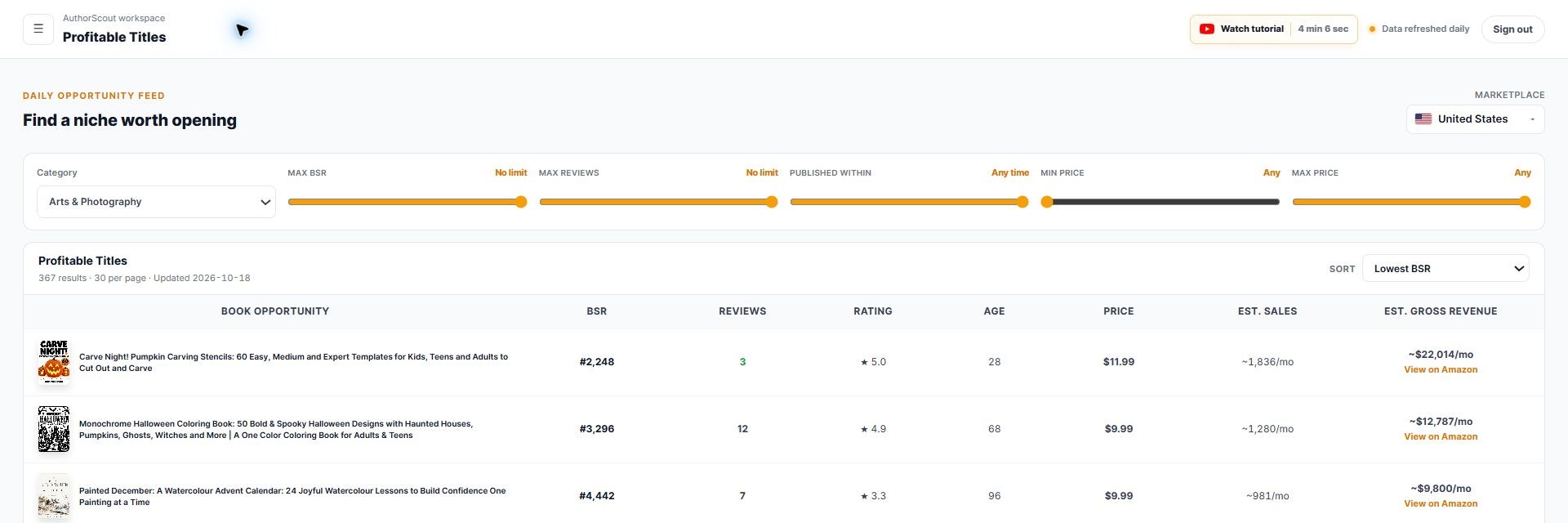
AuthorScout brings that discovery work into one searchable workspace. Choose a niche, open the Profitable Titles feed, and narrow the results to independently published books with sales activity, recent publication dates, and relatively few reviews.
From there, you can examine the book’s history, explore categories, compare marketplaces, screen a title for trademark matches, and keep watching competitors. You spend less of your research session collecting scattered details and more of it deciding which ideas deserve your attention.
Find promising independent books without opening dozens of tabs
Profitable Titles is where that time saving begins. You do not have to discover every potential opportunity by searching Amazon book by book.
Log in, select the marketplace available on your plan, and choose the niche you want to work in. AuthorScout brings together discovered independent books so you can compare the useful signals in a table.
For finding newer opportunities, look for these criteria together:
- Independently published: Study books from independent publishers to find examples relevant to your own publishing approach.
- Showing sales activity: Use Best Sellers Rank and available sales estimates to identify titles worth investigating.
- Recently published: Set the publication-age filter to focus on books that have entered the market recently.
- Relatively few reviews: Find titles attracting buyers before building a large review history.
The combination matters. A long-established bestseller with thousands of reviews tells a different story from a newer independent book with a strong sales rank and only a handful of reviews. The newer title may reveal a subject worth exploring while the market is still developing.
For example, if you want to publish an activity book, open the relevant niche, narrow publication age, lower the maximum review count, and compare the remaining titles by rank and price. You have a shortlist to investigate without first opening every listing individually.
The feed is refreshed daily, and Pro unlocks the complete discovery feed across its available niches and marketplaces. Free access is a limited preview. You can keep exploring the available feed instead of building each shortlist from scratch.
The feature’s name describes its purpose: finding potential publishing opportunities. A listing in Profitable Titles is a research lead; actual profit depends on production costs, advertising, pricing, and your own book’s results.
Explore book opportunities across seven marketplaces
Researching another country should not mean repeating the entire discovery process from the beginning.
AuthorScout’s discovery system covers seven Amazon marketplaces:
- United States
- United Kingdom
- Germany
- France
- Canada
- Spain
- Italy
Marketplace access depends on your plan and current availability. Choose an available store to explore its discovered books and niches from the same workspace.
When you want to investigate one particular book internationally, BSR Across Marketplaces compares its available rank and price across supported Amazon stores. This saves the repeated work of opening each store and checking the same book manually.
Each store has its own market. A rank in one country does not represent the same sales volume as the identical rank elsewhere, so use the comparisons to guide further research.
Check BSR, price, and review history before committing
Finding a book that looks promising today is the first step. Book Deep-Dive helps you check whether its performance has held up over time.
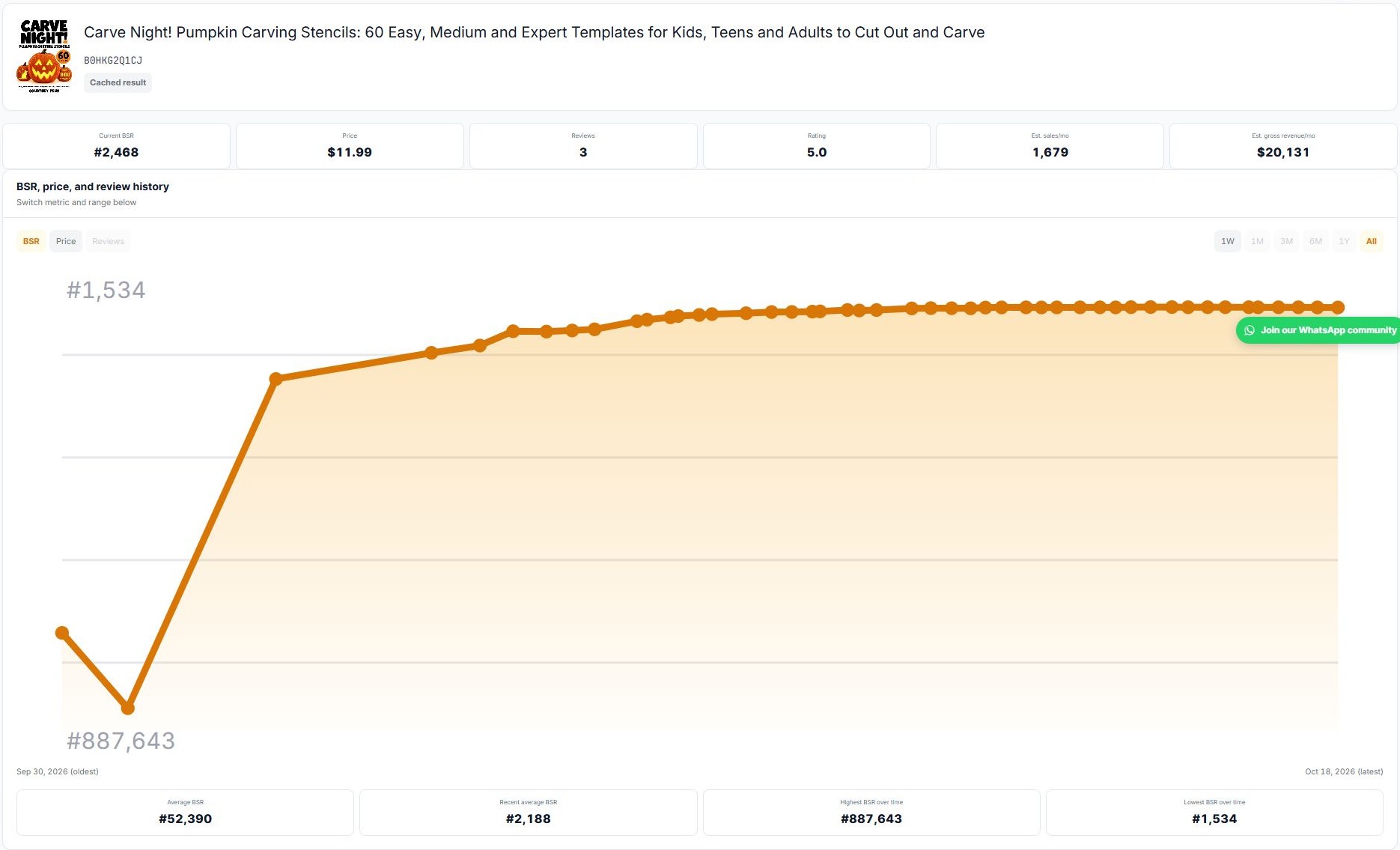
Instead of recording today’s numbers and returning repeatedly to see what changed, examine the available history:
- BSR history: See whether rank has stayed relatively steady, improved, or weakened.
- Price history: See how pricing changed alongside performance.
- Review history: Follow how the review count developed.
- Rating history: Examine changes in the book’s rating where data is available.
- Sales and revenue estimates: Put the current opportunity into context.
For example, a strong rank today may look more interesting when the book has maintained similar performance for several weeks. A sudden movement gives you a reason to investigate possible promotions, price changes, or seasonal demand.
Sales and gross revenue figures are estimates, not actual publisher earnings or profit. Historical coverage varies by book.
Find relevant categories without searching every branch
Once you have an idea, the next question is where it belongs. AuthorScout gives you two ways to work through that decision.
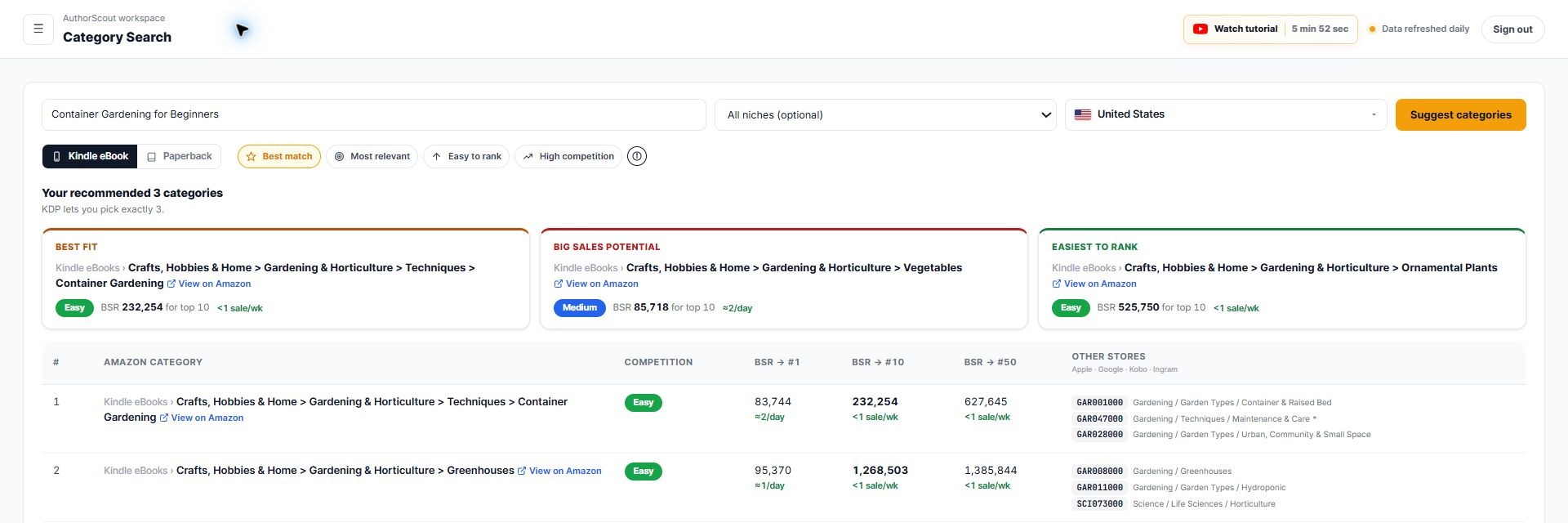
- Category Search starts with your idea. Enter a title or topic to find relevant category paths and compare ranking benchmarks. This reduces the need to navigate Amazon’s category branches one by one.
- Category Explorer starts with the market. Browse category paths and use available demand and competition filters to investigate areas before settling on a title.
The tools help you compare relevant options with evidence. For a container-gardening book, you can examine related gardening categories, the ranks of leading books, and how closely each category matches your intended reader.
Choose a category your book genuinely fits. A lower competition label alone does not make it the right choice.
Search your topic and prioritize the books worth studying
You may already have a subject in mind and want to see what is working around it.
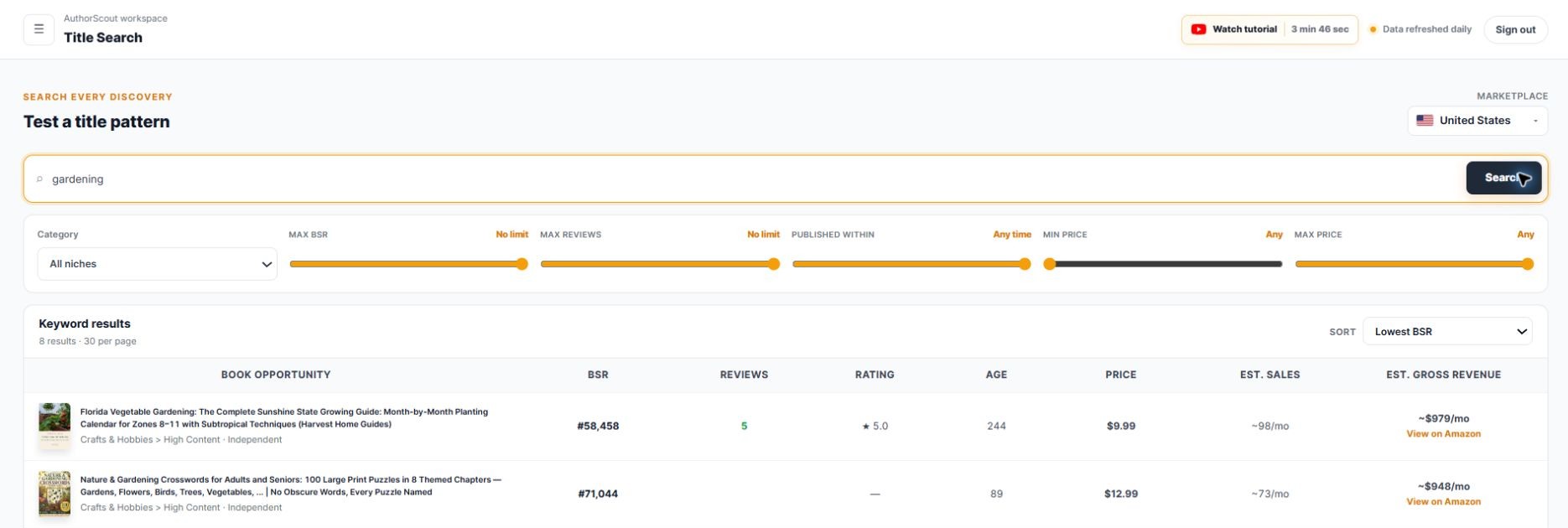
- Title Search: Search words or phrases across AuthorScout’s discovery database, then filter the matching books. This helps you investigate a topic without manually collecting every title.
- Top Performing: Sort discovered books using rankings such as estimated revenue, BSR, reviews, rating, or publication age to decide what to inspect first.
A search for “gardening,” for example, brings matching titles into a comparison view. You can inspect their prices, ages, reviews, and available estimates before choosing which books to examine more closely.
This screen searches discovered titles. Its results should not be mistaken for keyword search-volume measurements.
Screen your title before investing in the launch
A promising topic still needs a carefully chosen title. Trademark Checker lets you screen a proposed phrase against connected US and EU trademark records.
- Check a title phrase before investing in cover design and publishing materials.
- Review exact or similar matches returned by the tool.
- Identify names or phrases that deserve closer investigation early in the process.
The practical benefit is catching potential issues while a title is still easy to change. Screening is an initial research step, not legal clearance or a guarantee that a title is safe to use.
Keep watching competitors without repeated manual checks
You should not have to rebuild your competitor spreadsheet every time you return to an idea.
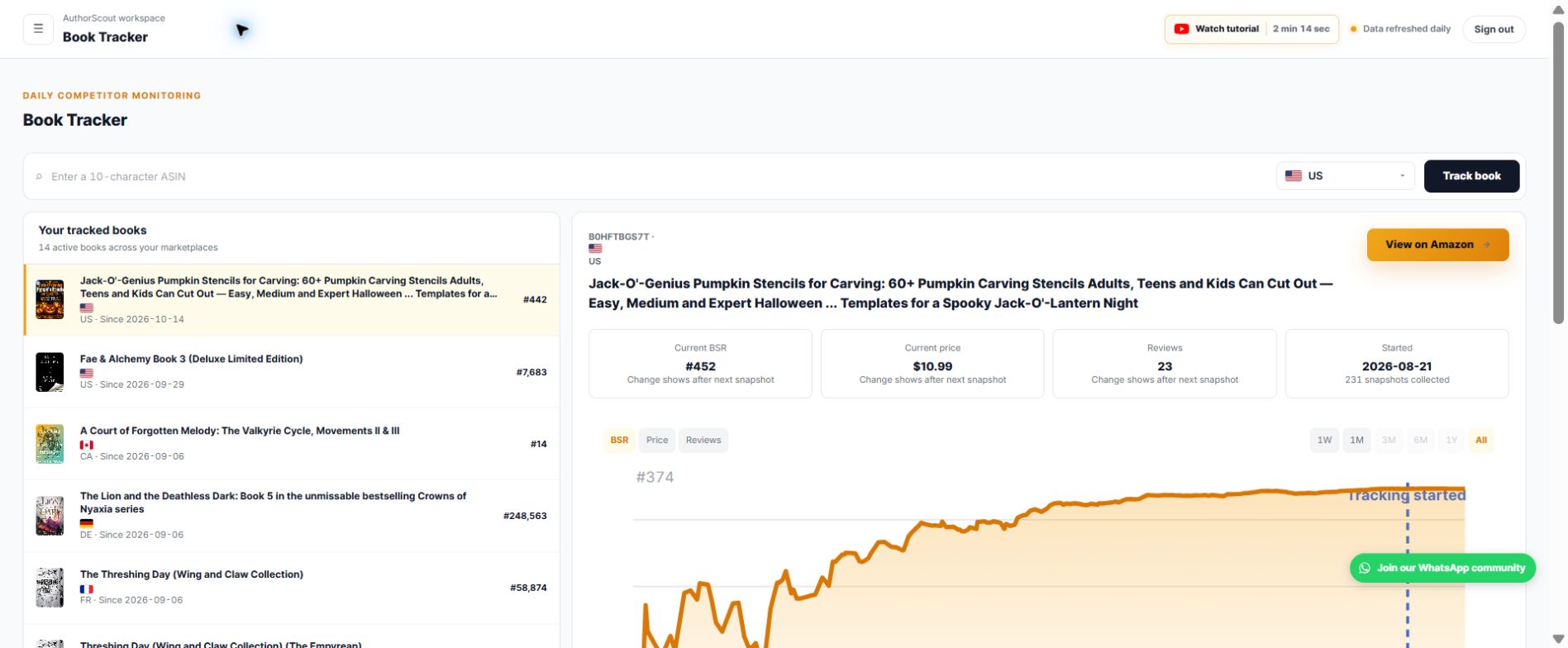
Book Tracker keeps selected books together and records daily snapshots, so you can return to the same research and inspect how it has developed.
- Follow sales-rank movement over time.
- Check available price, review, and rating changes.
- Watch promising titles while you develop your own concept.
- Keep monitoring comparable books after publishing.
Deep Dive helps you investigate a book’s available history. Book Tracker makes following selected books an ongoing part of your workflow.
Keep the rest of your research in the same workflow
The rest of AuthorScout supports the decisions around that core research process:
- Chrome extension and Amazon page analysis: Inspect book information while browsing Amazon, reducing the need to copy details between tabs.
- Edition and audiobook signals: Check available formats as part of evaluating a book’s market presence.
- Publishing calculators: Model sales, KDP earnings, and audiobook royalties using the available inputs and assumptions.
- MCP access: Use supported AuthorScout research tools through a compatible AI client, keeping the research inside your conversation.
Feature access and usage allowances vary by plan. Check AuthorScout’s current plans for the available access.
Go from a niche to a publishing decision
A practical AuthorScout research session can follow one connected sequence:
- Choose a niche and marketplace. Open the available Profitable Titles feed.
- Find newer independent books gaining traction. Narrow by publication age, reviews, rank, and price.
- Inspect the strongest candidates. Check BSR, price, and review history.
- Explore the positioning. Compare relevant categories and investigate related title ideas.
- Screen your proposed title. Review potential trademark matches.
- Track the books that matter. Keep gathering context while you develop your own book.
The time saved comes from having these research steps connected: a ready discovery feed, comparable book details, historical context, category tools, and ongoing tracking.
You bring the original idea and your understanding of readers. AuthorScout helps you find and evaluate the market evidence around it.
Start with books already showing sales activity.
Choose a niche, explore independent titles, and investigate your next book idea with AuthorScout.
Explore AuthorScout