AuthorScout vs KDSpy: Two Ways to Research Books
Compare browser-based book analysis with a discovery-feed workflow, and see how each can support a clearer publishing decision.
Many authors begin research on an Amazon category page. Others want a filtered list of promising books before they start browsing. That difference makes AuthorScout vs KDSpy a useful comparison: where should your research session begin, and how will you carry the evidence forward?
Both tools serve book publishers, and both can support competitor research. AuthorScout combines a discovery feed with historical analysis, categories, marketplace comparisons, and tracking. KDSpy brings research into the browser as you explore Amazon. Choosing between them means looking at your working habits as well as the feature names.
The practical difference
| Your decision | AuthorScout | KDSpy |
|---|---|---|
| Starting point | Filtered discovery feed | Amazon pages in the browser |
| Shared research goal | Book and category investigation with monitoring | Book and category investigation with monitoring |
| Approach to evaluate | Connected discovery-to-tracking workspace | Browser-centered analysis workflow |
| AI and creation workflow | Research MCP plus separate guided Book Creator | Browser research and ChatGPT prompt insights |
What KDSpy already does
The KDSpy product page describes category analysis, keyword suggestions, title word clouds, author-page analysis, book tracking over 30 days, and ChatGPT-oriented insights. It also advertises a one-time purchase. Check its current offer and supported browser requirements before buying.
These capabilities overlap with some of AuthorScout’s research goals. In particular, tracking is not exclusive to AuthorScout. If you already know which Amazon page or author you want to investigate, KDSpy’s browser-centered approach may fit the way you work.
Begin with discovery when you do not have a shortlist
Finding the right books to inspect is often the most repetitive part. You search a topic, open a result, check the publisher, count the reviews, look at the date, and repeat. The process can be informative, but much of that first pass is collection work.
In AuthorScout, start with Profitable Titles and choose a niche and available marketplace. Filter the discovered independent books by age, review count, BSR, and price. The aim is to locate recent titles showing sales activity before they have built a large review history.
- Profitable Titles provides the initial pool of books to investigate.
- Top Performing lets you prioritize that pool by the signal you care about.
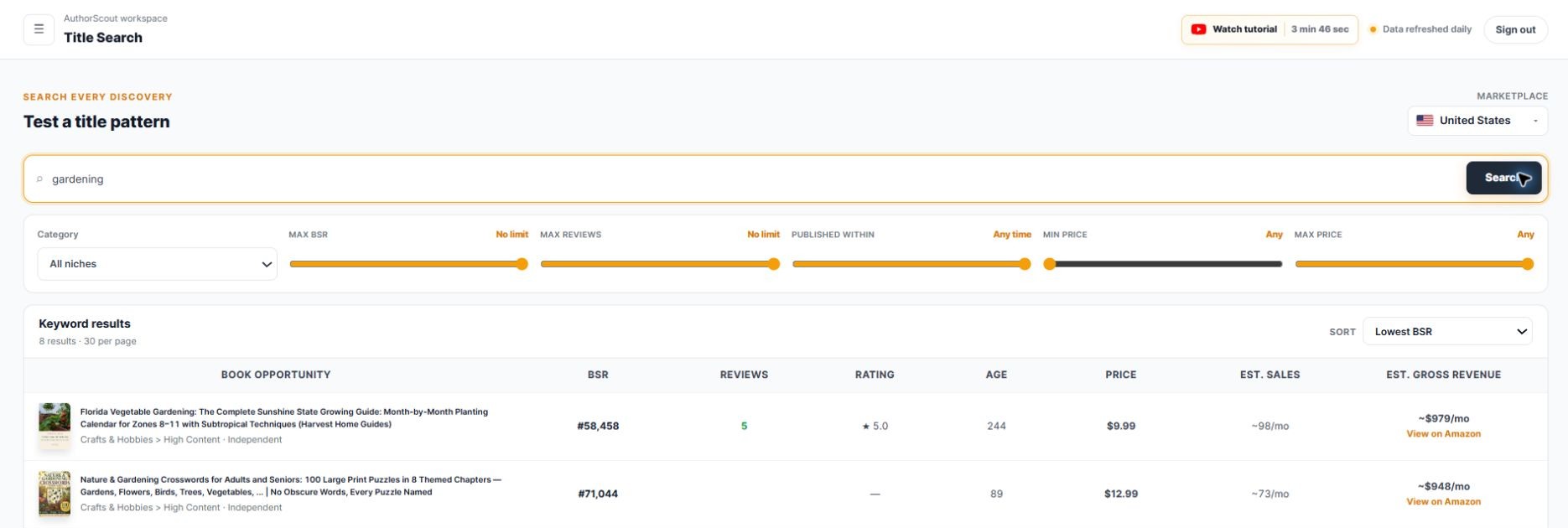
- Title Search helps you explore a phrase or subject within the discovery database.
For example, an author considering a practical gardening guide can compare newer independent books together before deciding which listings deserve detailed reading. A handful of low-review books is a starting point for investigation, not a promise of easy competition.
Compare the history behind a promising rank
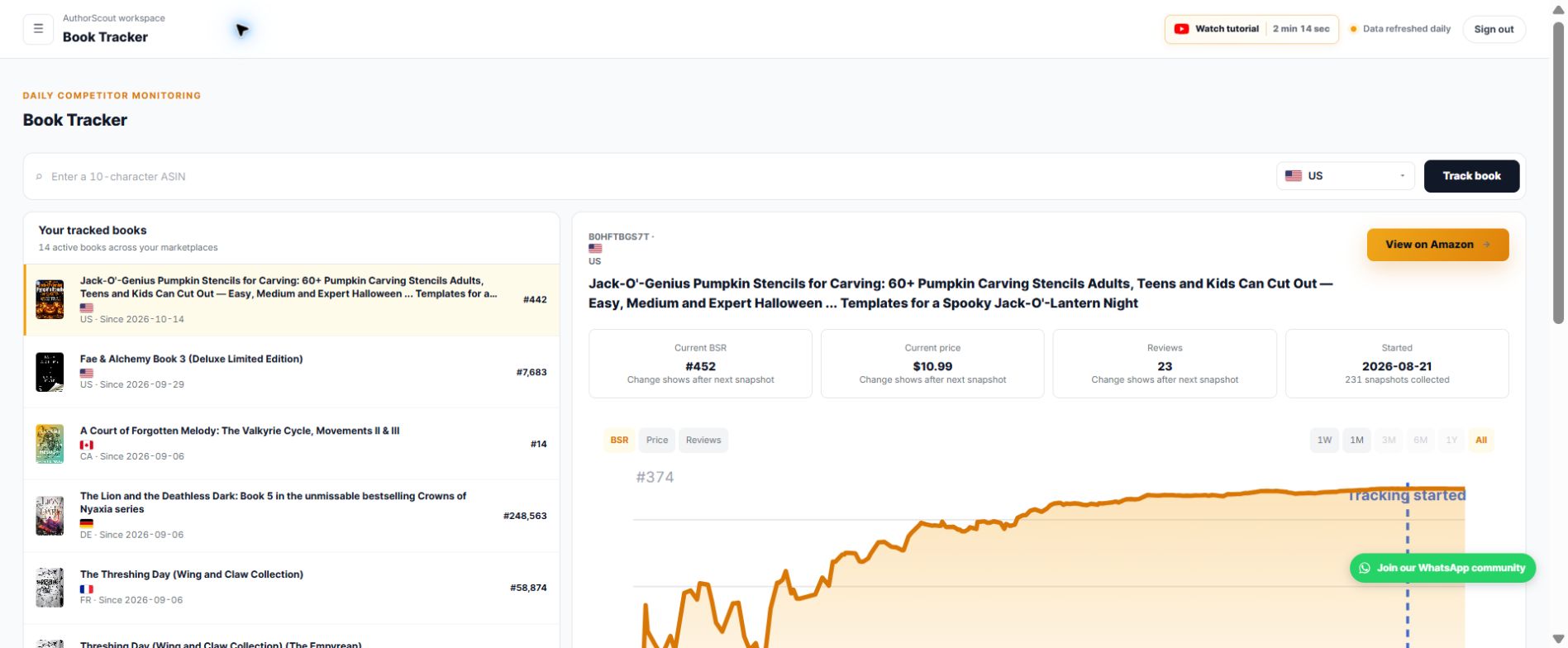
After finding a candidate, open Book Deep-Dive to inspect available BSR, price, review, and rating history. That adds context to the current snapshot. A book whose rank has moved sharply calls for a different question from one with a steadier pattern.
Book Tracker then follows selected titles through daily snapshots. Use it while planning your own book so you can revisit the evidence rather than reconstruct the shortlist each time. Historical availability varies by book; a gap should remain a gap in your assessment.
KDSpy also describes daily book tracking. When comparing the two tools, examine the history and presentation you actually receive for books relevant to your niche. Avoid assuming that matching feature names imply identical data coverage, or that different estimates prove one service is wrong.
Move from one book to a wider research picture
AuthorScout connects the candidate with other checks. Category Search helps find paths relevant to your title or description. Category Explorer helps investigate the surrounding category landscape through demand and competition signals.
The discovery feed spans seven marketplaces: the US, UK, Germany, France, Canada, Spain, and Italy, subject to plan access. BSR Across Marketplaces performs a different task: enter one ASIN and compare its available ranks across supported Amazon stores from one action. You can identify where to investigate next without manually repeating the same initial check.
- Trademark Checker: screen a proposed phrase against US and EU records.
- Chrome extension: inspect book information while browsing, including available print, Kindle, and audio editions.
- Calculators: model publishing sales and royalty scenarios.
- MCP: run supported AuthorScout tools through a compatible AI assistant.
The advantage to evaluate is how these steps connect for your research, not a claim that software can decide what readers will buy. Review the live features against a real project.
From research to creation with MCP and Book Creator
AuthorScout MCP connects supported research tools to a compatible AI assistant. For example, ask: “Using AuthorScout, find cookbooks with fewer than 50 reviews, then help me investigate the strongest candidates.” Inspect the returned book evidence, compare the candidates, and decide what deserves a deeper check.
- One research account: MCP access is included with active Pro access, using your existing allowances.
- Conversational research: ask follow-up questions about the evidence instead of copying information between tabs.
- Control over tracking: confirm additions or removals from Book Tracker and disconnect the assistant when needed.
AuthorScout Book Creator adds a separate, guided creation workflow in ChatGPT. It walks through a supported book type one step at a time; coloring books are the first documented format. You can develop a page plan, front matter, age-appropriate illustration prompts and images, a cover illustration, layout guidance, and a draft listing with the assistant. Check the current book-type catalog before starting.
Book Creator does not require an AuthorScout account. It is separate from the research MCP connection: you bring your validated audience and brief into the creation conversation, review the output, prepare your files, and publish through KDP yourself. That makes research useful at the production stage without treating AI output as a finished, checked book.
Which approach fits your research habits?
Consider AuthorScout when you want a discovery feed to generate your shortlist and a workspace to investigate it. Consider KDSpy when researching directly from Amazon pages is central to your process. You can also use a browser tool alongside a separate discovery workflow.
Compare the current purchase terms with AuthorScout’s free and paid access, including the limits that affect your research. A one-time purchase and a recurring subscription deserve a comparison over the period you expect to use them.
Whichever route you choose, combine the numbers with reading actual listings, understanding the intended audience, and developing an original book. Rank-based sales estimates are not verified profits, and trademark screening is not legal clearance. The goal is a better-informed publishing decision, followed by a book that gives readers a reason to choose it.
Sources and scope
Written by AuthorScout. Competitor features checked against official product information on October 18, 2026. This compares documented workflows; it is not an independent performance benchmark. Plans, access, and coverage can change. Screenshots show examples from AuthorScout, not promised sales results.
Put your next book idea through the research.
Explore the evidence, develop your brief, and choose your publishing workflow.
Start with AuthorScout →