AuthorScout vs Helium 10 for Amazon KDP Research
Compare a focused book-research workflow with a broader Amazon seller toolkit, and choose the tools your publishing process needs.
If you publish books through Amazon KDP, choosing research software starts with the work you need to finish. Are you trying to find a promising subject for your next book, or manage a wider Amazon selling business? AuthorScout vs Helium 10 is useful to consider through that distinction.
AuthorScout brings book discovery, historical analysis, category research, marketplace comparisons, and competitor tracking into one workspace. Helium 10 offers a broader collection of product research, keyword, listing, advertising, and seller-operation tools. Both can inform research. The practical question is which workflow fits your next publishing decision.
The practical difference
| Your decision | AuthorScout | Helium 10 |
|---|---|---|
| Starting point | Book opportunities and niche feeds | Product and keyword research |
| Research follow-through | Book history, categories, tracking | Listing and seller-management tools |
| Best fit to evaluate | Independent book research | Broader Amazon selling workflow |
| AI and creation workflow | Research MCP plus separate guided Book Creator | MCP for supported Helium 10 data and seller tasks |
What Helium 10 brings to the comparison
Helium 10’s official tools directory includes Black Box and Xray for product research, Magnet and Cerebro for keywords, and tools for listings, advertising, and inventory. Cerebro investigates the keywords associated with competing ASINs.
That scope is worth considering if your work includes selling physical products alongside books, or if your main task is researching search terms and optimizing seller listings. Check which tools, marketplaces, and account connections your chosen plan supports. A feature designed for Seller Central should not automatically be assumed to work the same way for a KDP account.
Start with books already attracting buyers
An independent author often has an earlier problem: finding worthwhile books to study. A promising keyword still leaves you checking publication dates, publisher names, reviews, and ranks across individual listings.
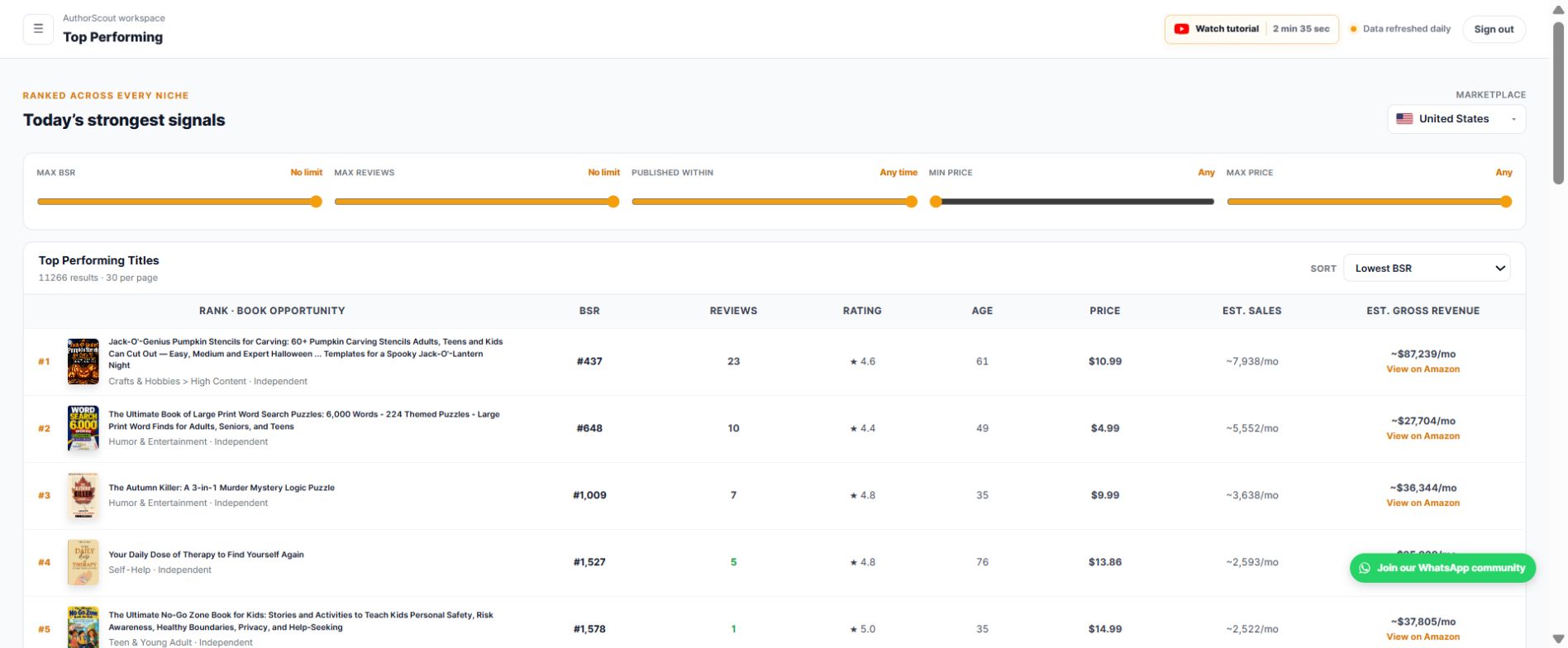
AuthorScout’s Profitable Titles feed makes that first pass easier. Choose a niche and an available marketplace, then narrow the discovered books using the signals that matter:
- Independent publication: focus on examples relevant to an independent publishing business.
- Recent release: investigate books that entered the market recently.
- Few reviews: look for traction before a substantial review history has accumulated.
- Sales activity: use BSR and available estimates to identify candidates for closer research.
You can prioritize the results with Top Performing or use Title Search to explore a particular subject. This creates a research shortlist without first collecting every listing yourself. A title match is not a measurement of keyword search volume.
Follow the evidence beyond the first result
Suppose you are considering a beginner gardening guide. A newer independent book with few reviews and a promising rank is a useful lead. It does not yet tell you whether demand is sustained or whether your proposed book would serve readers differently.
- Open Book Deep-Dive: review available BSR, price, review-count, and rating history. Look for patterns rather than relying on today’s rank.
- Use Category Search and Category Explorer: compare relevant category paths, demand signals, and ranking benchmarks.
- Run BSR Across Marketplaces: enter the book’s ASIN once and compare available rankings across supported stores from one action.
- Add it to Book Tracker: follow daily snapshots while you develop your own angle.
The discovery feed covers seven Amazon marketplaces: the US, UK, Germany, France, Canada, Spain, and Italy. Access varies by plan. The cross-marketplace ranking tool has its own supported-store coverage; seven discovery markets does not mean every tool has identical coverage.
Bring the remaining publishing checks together
After the shortlist, AuthorScout’s Trademark Checker helps screen a proposed title against US and EU trademark records. The extension supplies book information while you browse Amazon, including available edition and audiobook signals. Publishing calculators help you model sales and royalties using their stated assumptions.
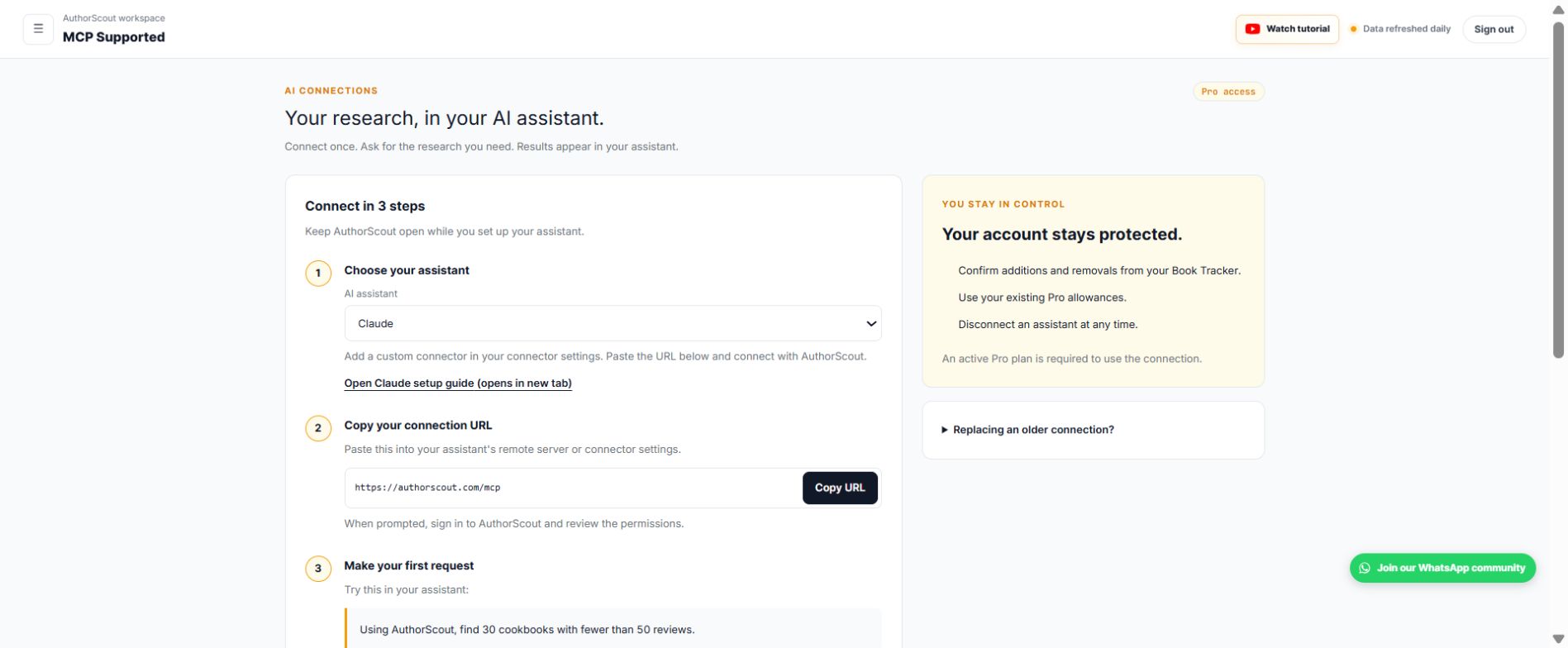
For authors who research through an AI assistant, supported AuthorScout tools are also available through an MCP connection. You can ask for research in a compatible client and inspect the returned evidence. Helium 10 also offers MCP access; the useful comparison is which data and tasks each connection supports, not simply whether it has AI.
From research to creation with MCP and Book Creator
AuthorScout MCP connects supported research tools to a compatible AI assistant. For example, ask: “Using AuthorScout, find cookbooks with fewer than 50 reviews, then help me investigate the strongest candidates.” Inspect the returned book evidence, compare the candidates, and decide what deserves a deeper check.
- One research account: MCP access is included with active Pro access, using your existing allowances.
- Conversational research: ask follow-up questions about the evidence instead of copying information between tabs.
- Control over tracking: confirm additions or removals from Book Tracker and disconnect the assistant when needed.
AuthorScout Book Creator adds a separate, guided creation workflow in ChatGPT. It walks through a supported book type one step at a time; coloring books are the first documented format. You can develop a page plan, front matter, age-appropriate illustration prompts and images, a cover illustration, layout guidance, and a draft listing with the assistant. Check the current book-type catalog before starting.
Book Creator does not require an AuthorScout account. It is separate from the research MCP connection: you bring your validated audience and brief into the creation conversation, review the output, prepare your files, and publish through KDP yourself. That makes research useful at the production stage without treating AI output as a finished, checked book.
Which should you choose?
Choose AuthorScout when your recurring task is finding and evaluating book opportunities. Its connected sequence is especially relevant when you want recent independent titles, historical context, category checks, and ongoing monitoring.
Consider Helium 10 when the broader seller toolkit fits work you actually do. You might also use a specialized keyword workflow alongside AuthorScout’s book research. Compare current plan allowances and total cost against your weekly tasks rather than counting features.
Neither a strong BSR nor a low review count guarantees profit. Estimates are directional, and trademark screening is not legal clearance. Start with evidence, then assess reader needs, production quality, and publishing costs. See AuthorScout’s current plans and the full research walkthrough before choosing.
Sources and scope
Written by AuthorScout. Competitor features checked against official product information on October 18, 2026. This compares documented workflows; it is not an independent performance benchmark. Plans, access, and coverage can change. Screenshots show examples from AuthorScout, not promised sales results.
Put your next book idea through the research.
Explore the evidence, develop your brief, and choose your publishing workflow.
Start with AuthorScout →