3 Free Chrome Extensions to Consider for KDP Research
Compare three Chrome extensions with free access for KDP research: AuthorScout, Writer Watch, and Helium 10. See their uses and limits.
About these recommendations: Written by AuthorScout. Selections reflect the task described here, not an independent accuracy test. Product information was checked on October 18, 2026; plans and allowances can change.
For Kindle Direct Publishing (KDP) authors, a browser extension can make book research easier by bringing useful information closer to the Amazon page you are already reading. The right choice depends on whether you want to inspect unfamiliar books, watch known titles, or investigate a broader product market.
These three options have documented free access, but they do not offer identical features or limits. Our order puts book-page investigation first, monitoring second, and broader seller research third. Choose the job before choosing the extension.
1. AuthorScout: our pick for researching book pages
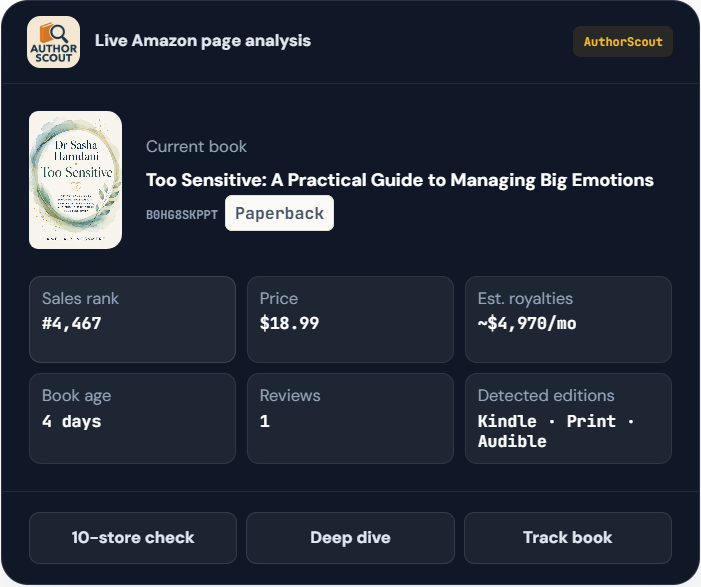
AuthorScout's free extension and Amazon page analysis are a useful starting point for independent authors. You can inspect available book information while browsing instead of repeatedly copying details into separate tools.
Look at the information as a group:
- Rank: a starting signal to investigate.
- Reviews and book age: context for how established the title is.
- Price and format: whether the book is a sensible comparison for your project.
- Edition and audiobook signals: whether you are examining the version you intended.
A recent book with a small review count may deserve attention, but that combination does not prove an easy niche. Read the listing and ask what readers are buying. A book with an excellent fit for a narrow audience may be more informative than an unrelated bestseller.
The extension also sits alongside AuthorScout's website. A free account has small allowances for certain deeper checks; the complete discovery and monitoring workflow is paid. Installing the extension does not unlock every Pro feature. Review the free and paid access.
2. Writer Watch: consider it for watching known US books
Writer Watch's store listing describes free notifications for book-price changes and new reviews. It lists a limit of 50 books per author and support for Amazon US. That makes it a different choice from a discovery feed: you start with books you already want to watch. Read its current listing.
For example, an author might want to notice a change to an existing title while spending most of the week writing. Decide whether that monitoring task is your priority before comparing it with tools intended for exploring unfamiliar books.
3. Helium 10: consider its limited free research access
Helium 10 documents limited free Xray access. It is an option for authors who also evaluate a wider Amazon selling business. Check its current allowances: a free extension download is not the same as unlimited use of its research features. See the official plan guide.
Use a specific book question when trying it. For instance, can the information shown help you compare relevant books, or does most of the screen answer questions about a different business model?
Compare them using the same research task
You do not need to install every extension at once. Pick the one whose purpose matches your work and test it on a short list of books.
- Choose three titles that serve the audience you want to reach.
- Check that each page shows the intended format and marketplace.
- Record what the extension helps you understand.
- Note any missing information or paid action you encounter.
- Decide whether it saves enough effort to become part of your routine.
Avoid running several overlays together during the first test. A cluttered page can make it harder to see which tool supplied a number or why two numbers differ.
Which should you start with?
Start with AuthorScout if your immediate task is examining book opportunities while browsing Amazon. Consider Writer Watch for its documented US monitoring use case, or Helium 10 if broader seller research is also part of your work.
This recommendation is about workflow fit, not a claim that one extension has independently proven superior estimates. Install AuthorScout from its official listing, then test it with a subject you understand well enough to judge the results.