3 Free Ways to Research Amazon KDP Categories
Research KDP categories with Amazon, Self Publishing Titans, and AuthorScout. Compare free access and build a relevant category shortlist.
About these recommendations: Written by AuthorScout. Selections reflect the task described here, not an independent accuracy test. Product information was checked on October 18, 2026; plans and allowances can change.
For Kindle Direct Publishing (KDP), category research helps you decide where a book belongs. It works best when you begin with the reader and the subject, then examine relevant shelves. A low-looking competition number is not a good reason to place a book somewhere it does not fit.
You can begin this work without paying for a complete research suite. The three options below move from Amazon's own guidance, to a standalone category finder, to AuthorScout's limited free category research. They are useful starting points with different access conditions.
1. Amazon's category guidance and storefronts
Begin with Amazon's own category help. It explains that category choices vary by marketplace and format, and links to regional bookstores. KDP currently lets authors select three categories, with relevance central to the choice. Read the official guidance.
Use that guidance to create a research brief before opening any finder. For example: “A beginner's guide to growing herbs in small indoor spaces.” The brief helps you reject categories that contain a matching word but serve a different reader.
2. Self Publishing Titans' Category Finder
Self Publishing Titans lists a Category Finder among its free tools. The tool currently directs visitors to sign in, so account access is part of the process. We have not verified the allowances inside a new free account. Visit the finder.
Treat any suggested category as a candidate to inspect. The purpose of a finder is to reduce the search effort; the final judgment still depends on the actual book.
3. AuthorScout Category Search
AuthorScout's free account includes a limited Category Search allowance. Enter a clear title or description, choose an available marketplace, and examine the suggested paths. The broader category system supports 12 marketplace trees, but access and allowances depend on the feature and plan.
This is useful when you want to move from a vague idea to specific paths worth investigating. Keep the description focused on the reader, subject, and intended level. “Gardening” gives much less direction than “indoor herb gardening for beginners living in apartments.”
For each candidate path, ask:
- Does the category describe the book's main subject?
- Would the expected reader naturally look here?
- Do comparable books address similar needs?
- Does the category apply to the format and marketplace I plan to use?
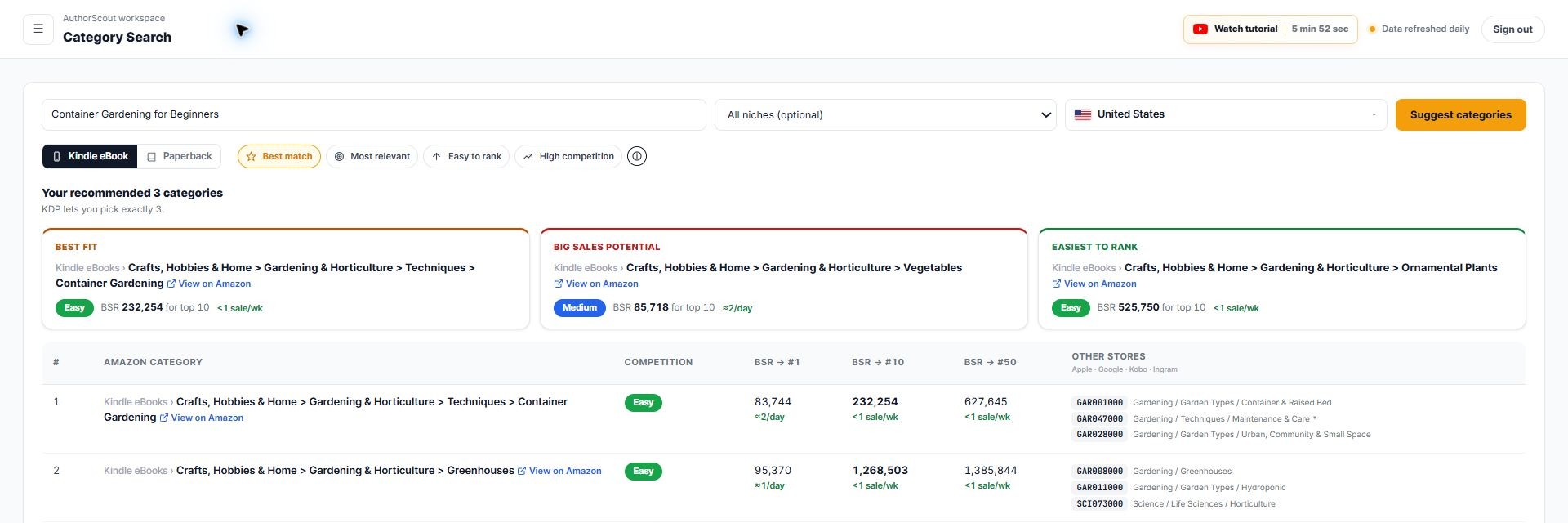
AuthorScout is our recommendation when you want category suggestions alongside book-page research and other follow-up checks. Check the current plan details before expecting unlimited searches or Category Explorer access.
Build a shortlist instead of chasing a badge
Create a simple category worksheet with four columns: path, why it fits, comparable books, and questions to resolve. Keep only a few strong candidates. A long list of unrelated paths makes the decision harder rather than better.
Imagine your herb guide covers growing conditions, watering, and harvesting. A category about cooking with herbs might contain interested readers, but it may not describe the book's main purpose. Write down that distinction. It is a useful editorial decision even before you open a competition tool.
Look at the full path, not just its final word. A similar label can sit beneath a different parent subject and imply a different audience. Return to your original brief whenever the research starts drifting.
Finish the check in KDP
Research tools help prepare a decision; KDP is where you confirm the choices available for your book. Recheck your intended audience, format, and primary marketplace when you prepare the listing. Category options can change, so keep your research dated.
For a free starting workflow, combine Amazon's guidance with one category finder and direct inspection of relevant books. If you prefer those checks to sit within a wider book-research process, try AuthorScout and use its limited category allowance on a well-defined idea.