
Spend less time switching tabs
Keep book details and research together on Amazon.
See book research beside Amazon listings, including ranks, sales estimates, and available editions.
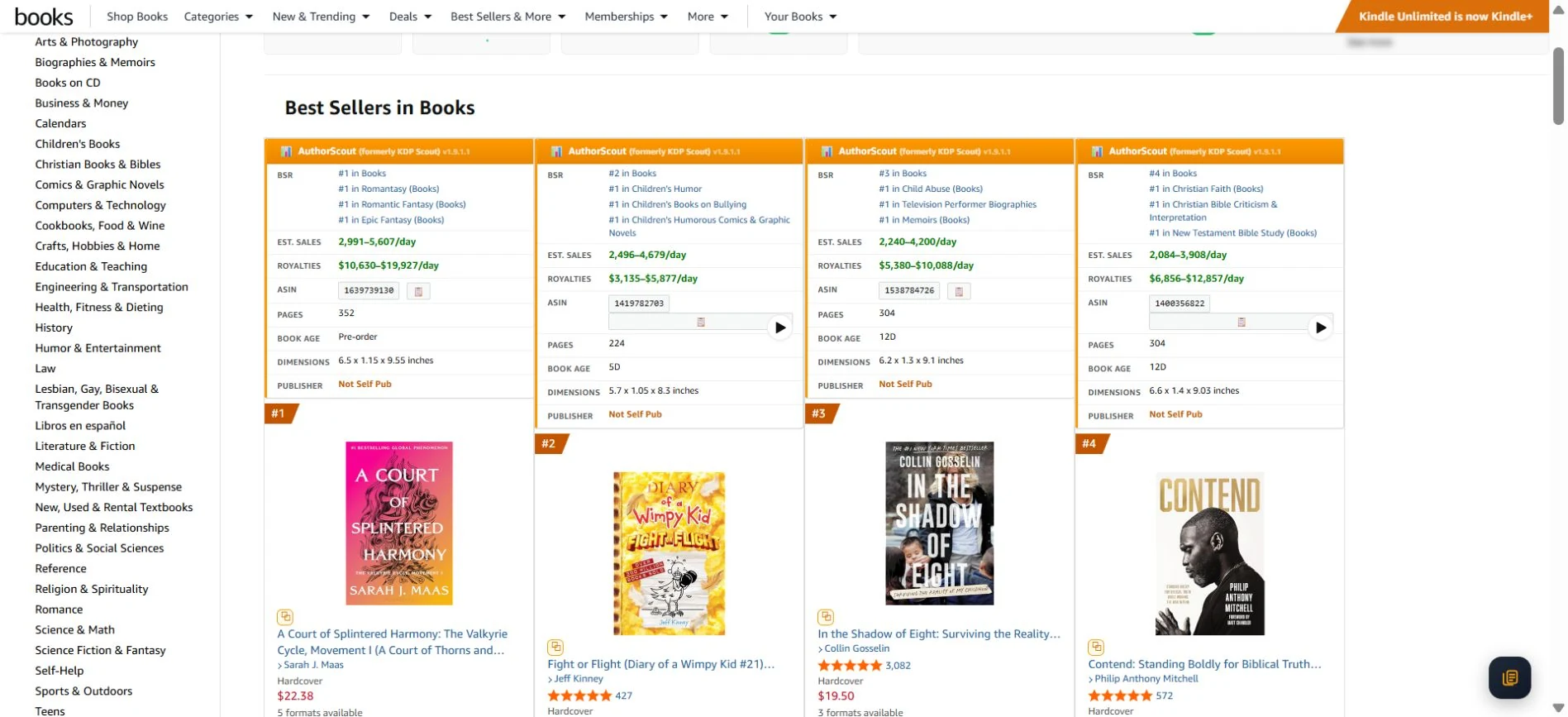
Here's how Chrome Extension fits into your research.
Add AuthorScout from the Chrome Web Store, then sign in to your AuthorScout account.
Visit the book's listing and open AuthorScout to see the available research for that edition.
Check sales rank, estimated sales, reviews, age, and formats. Continue with deeper research when a book catches your attention.
Keep book details and research together on Amazon.
See detected Kindle, paperback, and Audible editions.
Check audiobook availability before researching an opportunity further.
Install from the official Chrome Web Store. The web dashboard remains available for broader searches and comparisons.
Available tools and allowances follow your account's plan. The extension and website work together as part of your research.
The extension helps while you browse Amazon. Use the website for broader tasks such as title discovery, category comparisons, and tracking.
No. Check the editions and rights separately. An availability signal does not grant permission to publish someone else's work.
No. Estimated sales help you compare books. They are not a publisher's actual sales records.
Explore AuthorScout and find the tools that fit your publishing plans.