
Research in the conversation
Ask your assistant to find books, compare categories, or analyze an ASIN.
Connect AuthorScout to your AI assistant. Research books, categories, and competitors in the conversation.
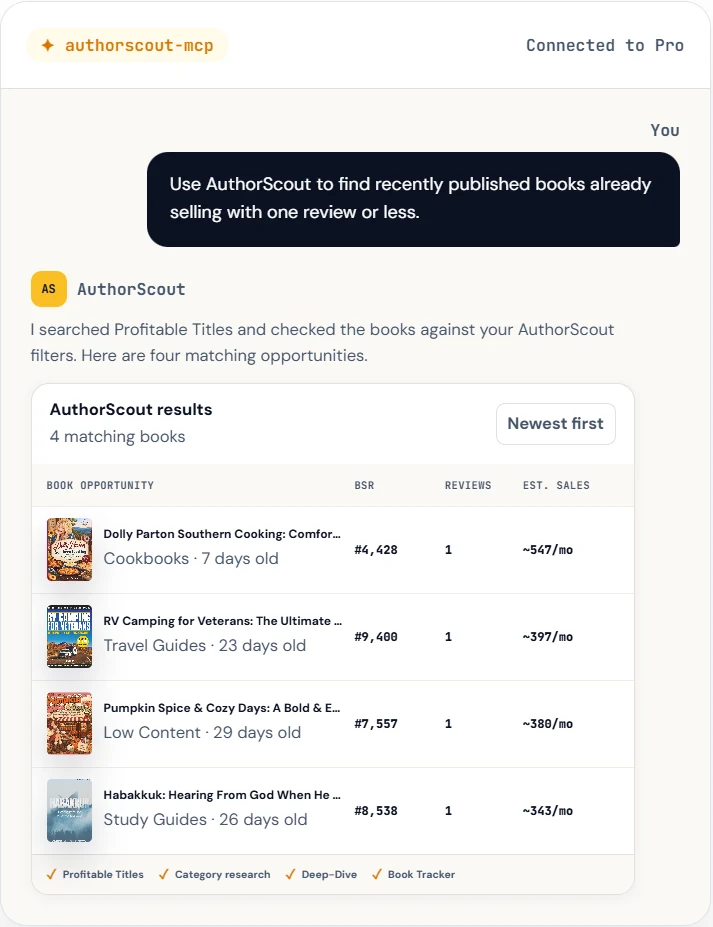
MCP connects your AI assistant to AuthorScout's research tools.
In an AI app that supports remote MCP connections, add AuthorScout using the connection address below.
Follow the sign-in prompt and review the requested access. Your existing Pro account and research allowances apply.
Name AuthorScout and describe what you need. Include details such as the marketplace, book title and subtitle, or ASIN when relevant.
Add this address in your assistant's remote MCP or connector settings, then sign in when prompted.
https://authorscout.com/mcpIn your dashboard, open Learn & connect, then AI connections. You can view setup guidance and manage connected assistants there.
Ask your assistant to find books, compare categories, or analyze an ASIN.
Include your title and subtitle for categories, or an ASIN and marketplace for a book.
Review connected assistants in your dashboard and disconnect them when needed.
Find book opportunities“Using AuthorScout, find 30 cookbooks with fewer than 50 reviews in the US.”
Compare categories“Use AuthorScout to suggest Kindle and paperback categories for Gardening for Beginners: Growing Vegetables in Small Spaces, in the US. Show all relevant matches.”
Look closer at a book“Use AuthorScout to analyze this book's ASIN in the US. Show its available rank, price, and review history.”
For the last example, add the book's 10-character ASIN to your message.
There is no separate AuthorScout MCP subscription. Your account permissions and normal research allowances still apply.
Your AI app and subscription must support remote MCP connections. Setup options and result displays vary by assistant.
MCP is a way for an AI assistant to use connected tools. Connecting AuthorScout lets your assistant request AuthorScout research during a conversation.
AuthorScout provides connection guidance for these assistants. Your particular account or workspace must allow custom remote MCP connections. Other compatible clients may have different setup requirements.
No. MCP is included with an active Pro subscription. Any subscription required by your AI app is separate, and your usual AuthorScout allowances apply.
No. Some clients display interactive results; others present text or tables. The assistant also decides how to summarize the returned research, so ask it to show the complete results when needed.
Connect your Pro account and bring AuthorScout into your AI workflow.