
Look before you commit
Check a title early, before the cover, the listing, and the launch are built around it.
A KDP trademark checker. Check a book title for trademark conflicts in US (USPTO) or EU (EUIPO) records, classes 16 and 41.
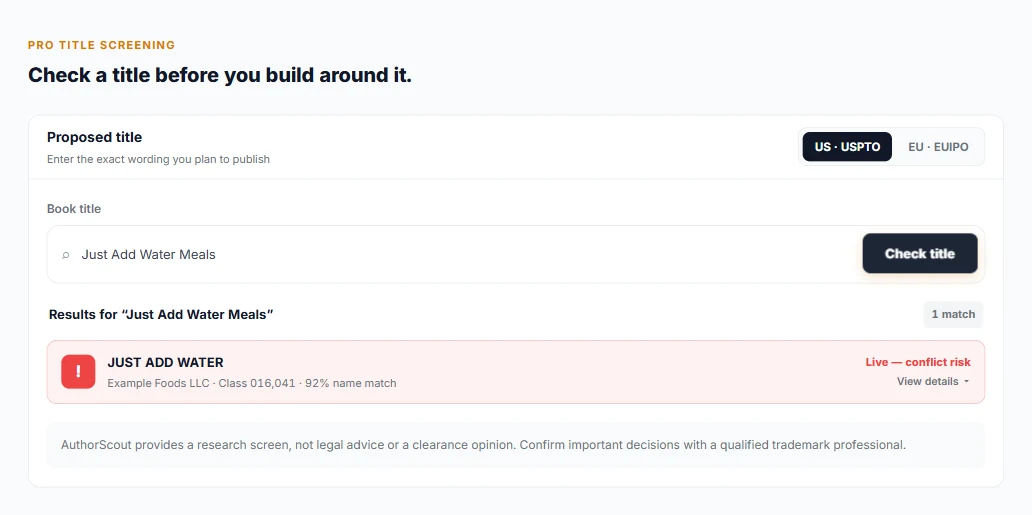
Here's how Trademark Checker fits into your research.
Type the book title you are considering.
Pick United States (USPTO) records or European Union (EUIPO) records.
See the marks that match or look like your title, ranked by a similarity score. Live marks (registered or pending) are shown differently from dead or abandoned ones.
Check a title early, before the cover, the listing, and the launch are built around it.
The checker looks only at class 16 (printed matter, including books) and class 41 (education and entertainment), the classes that can block a book title.
An exact match flag means a live exact match. Dead or abandoned marks are marked differently, so you can see which ones are still active.
Run it early, as soon as you have a title or series name you are serious about and before you spend time on the cover, the listing and the launch. The Trademark Checker is a quick screen that can show you marks worth looking at while changing the title is still cheap.
It is also worth using for series names, imprint names and distinctive phrases, not only the main title, if you plan to build a brand on them. Pro and Publisher Pro include unlimited checks, so you can test several candidates and compare them instead of settling on the first idea.
Treat the list as a set of things to examine, not a verdict. The similarity score measures how alike the words are. It does not judge meaning, market or how readers would see the two marks, so a high score is a prompt to look closer and a low score is not a clearance.
Open the closest marks and read what they are for. A live mark that is nearly identical to your title deserves serious attention. A dead or abandoned mark is shown differently, but that is information to bring to a professional, not a reason to stop thinking about it.
Check the same title in both the US and EU records if you plan to sell in both. Keep a note of the date you checked, the title wording you entered and the marks you looked at, because records change over time.
It screens only US (USPTO) and EU (EUIPO) records, and only classes 16 and 41. Class 9, which covers downloadable ebooks and audiobooks, is not checked. Other countries are not covered either, and nothing outside those records and classes appears in the results.
That matters if you publish Kindle ebooks or audiobooks, or if you sell in markets such as the UK or Canada. A clear result means only that this screen found nothing in the records it checks. It does not make a title safe.
The checker also cannot see unregistered, common-law use, or claims that have not reached the records it reads.
Whether two marks conflict is a legal question about the goods, the markets and the likelihood of confusion, and a word-similarity score cannot answer it. A qualified trademark professional can search more widely, including the classes and countries this screen leaves out, and can advise on your specific situation.
This page is not legal advice. Use the Trademark Checker to rule out obvious problems and to arrive at the conversation with a shortlist. The more you plan to invest in a title, a series or a brand, the more a professional check is worth paying for.
Choose USPTO or EUIPO records. Other countries are not covered, and marks in classes other than 16 and 41 are not shown.
The similarity score measures how alike the words are. It is not a legal opinion on likelihood of confusion or a clearance opinion. Confirm important decisions with a qualified trademark professional.
No. A clear result only means this screen found nothing in the records and classes it checks. It does not make a title safe, so confirm important decisions with a qualified trademark professional.
No. It is a research screen. The similarity score compares words, not meaning or market context, and it is not an opinion on likelihood of confusion.
Those are the trademark classes that can block a book title: class 16 covers printed matter including books, and class 41 covers education and entertainment. Marks in other classes are not shown.
It is not on the Free plan. Pro and Publisher Pro get unlimited checks. It is also available through AuthorScout MCP.
Explore AuthorScout and find the tools that fit your publishing plans.
